Showing posts with label sidebar. Show all posts

Sunday, April 29, 2007

How do I add a linked pikcher to my sidebar?

The Meezer Gang asked...


Skeezix,
How does one put a link to a picture in the sidebar in blogger? I see where you can add a picture and then add a link but not link a picture.
Thanks,
Meezers

If yoo want to link a pikcher and are using the widget interface on Blogger, yoo need to go to yer template, klik "Page Elements" so yer on the widget interface, and klik "Add a Page Element." In the popup, yoo'll selekt the "HTML/Javascript" widget by klikking "Add to Blog" ...
... in the Popup, enter the text for yer hedding, and than paste the HTML for yer linked image, for example:

<a href="http://www.cafepress.com/oreosmith" target="_blank"><img border="0" alt="Oreo's Store" src="http://www.skeezixthecat.com/images/catbloghelp/oreosStore.jpg"/></a>

Don't fergit to klik the oranje SAVE buttun on yer template page win yer dun to save the changes to yer template.

Tuesday, February 20, 2007

How to add Sidebar Content

My noo best frend Oreo the Cat asks:
I dont get how to post icons to my side bar of my bloggie...like the one for the bloggie party.....where do you post the code for the thing to appear in the sidebar!
Oreo, I'm assooming yer qweschun is abowt New Blogger's widjit interface. (If not, pleeze klarify yer qweschun in the comments feeld of this post.) With noo blogger, altho yoo can modify yer template direktly, whut yer prompted to do by deefawlt is use the widget interface to add and deleete content frum yer template. This reqwires a lot less HTML knowlidge on yer part (although going to modity the HTML in yer template direktly is now more komplikaytid.)

STEP ONE: GO TO THE WIDJIT INTERFACE TO MODIFY YER TEMPLATE. To do this, go to the Template Tab, and klik the Page Elements link:


STEP TWO: CLIK THE "ADD PAGE ELEMENT" LINK. In the template I use, yoo have a choice of placing it in the top grooping in yer sidebar or in the bottum grooping. (I'll show yoo later how to moove it within that grooping.) This will pop-up a window.


STEP THREE: KLIK "ADD TO BLOG" BUTTUN TO CHOOZE TO ADD THE HTML/JAVASCRIPT PAGE ELEMENT. This will pop up a window in wich yoo can enter the code for the link and the image. (For info on how to create the HTML for links and images, KLIK HEER.)

STEP FOUR: RITE YER TITUL AND ENTER THE CODE FOR YER LINKED IMAGE. Yoo can klik the Rich Text link for eezier editing. Save yer changes.


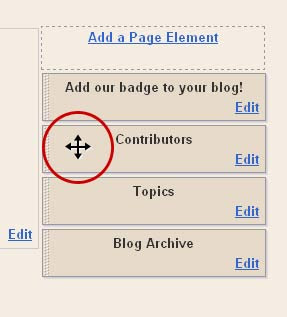
STEP FIVE: DRAG YER BLOK TO WHATEVER POZISHUN YOO LIKE. Back in the widjit template page, yoo can drag yer new element to whatever pozishun yoo like. When yoo mouse over an element, a cross thing will appeer, wich allows yoo to drag and drop yer elements. Once yer done, clik to save and that's it!
Thursday, January 25, 2007

How do I get a badge up on my blog?

My best frend, Jeter Harris, rites:

deer skeezix ... (or anycat on da help teem)
i am tryin an tryin to put da badge dat lux gave me fer da honorabul menshun on mi blog. i copied it an put it on mi catster paje so i would hav a code ... but no matter wut i do ... i can't figyer owt how to put it on mi blog. i am a old blogger, btw.
pleez help me.
thank u.
yerz troolee--jh
Jeter, klik heer for yer code. Yoo'll just copy and paste it into the area of yer template ware yoo wunt the badge to appeer. (For thoze of yoo in noo blogger with the widget-based template, use the HTML/Javascript widget box.)

Basikly, yoo need to create 2 links: an image link (so they'll see yer image) and the link to the six werd story blog. The image link will be in the middle, with yer link tag contayning the URL yer linking to at the beginning and a clozing link tag (</a>) at the end:

<a href="http://sixwordcatstory.blogspot.com/2007/01/six-word-contest-entry.html"><img src="http://files.dogster.com./pix/cats/02/214902/214902_1169678480.jpg" border="0" > </a>

Yoo'll find more info on the HTML yoo'll use HEER and HEER.