Sunday, May 27, 2007

How do I resize the cowntdown klok?

My best frend Jeter Harris rites:

deer skeezix,
i reelee like da cowntdown u hav on yer paje fer blogblast fer peece. i would like to put one on mi paje, too. evreetime i put in da code ... it messez up mi paje becuz it'z too big. can u help me wid dis?
thank u.
yerz troolee--jh

Hey, Jete, it's not too hard, yoo just hafta know ware to look. Heer's whut yoo need to do:

  1. Configyer yer cowntdown klok heer: http://www.pyzam.com/toys/48
  2. Klik the "Get the code for my Count Down" buttun.
  3. Copy the code and paste into yer widjit window for yer blog (the HTML/Javascrip one).
  4. Find in the code ware is sez Height="380" Width="280" (see below)
  5. Change the height and width to fit yer sidebar. I used Height="120" Width="210"
  6. Save and chek to see how it looks - fiddle sum more with the height and width if necessary.
In the pikcher beelow, yoo can see ware the height and width appeer in the code:

Saturday, May 26, 2007

Help! My Cat started peeing on the bathroom rug

NOTE: The Cat Blog Help Center only offers advice on teknikul topiks relaytid to blogging. However, as a one-time ixsepshun, We will try to provide help on a cat beehavyer topik. PLEEZE REPLY IN THE COMMENTS FEELD IF YOO HAVE SUGJESCHUNS FOR JEANIE.

Jeanie rites:

I need help with my cat. She is about 2 years old and has a bad problem with peeing on the bathroom rug. She is litter trained and just started about 2 weeks ago with bad habit. We have tried everything, Pet Srpay, Pepper, Bleaching the rug, and washing it. We dont know what else to do. Any Ideas would be nice.Thank You For Your Time
Deer Jeenie,
We feel yer pane. Reely, we do.

Are thare any changes in yer howsehold reesintly that cood be stressing yer cat? Like, sumwun new livving thare, a new cat, construkshun or noise arownd the litterbox area? Offin, a change in the envirmint will cauze stress and pee problims in cats that have bin good with the litterbox until now. For ixampul, win Mr Tasty Face mooved in with the Food Lady, her cat Perl peed all over Mr Tasty Face's ixpensive furrnicher. Not just once, but many many many times.

Has she bin spayed? Unspayed feemales will pee owtside the litter box to let males know thare avaylubul.

If yoo feel yoo've tride evry remedy and yer cat has bin spayed and nuthing has chanjed in yer envirnmint, yoo shood have yer cat ixzamind as soon as possibul by a vet, becuz this is a simptum of sevrul seveere medikul problims, inklooding a yerinary blokkije, a bladder or yerinary trakt infekshun and hormone problims, as well as other medikul reezins. Thare's a good chanse yer cat is in pane and trying to elimate sumware else, sinse she eqwates her litterbox with panefull eliminayshun.

Reemember, peepul arn't smart enuf to unnerstand cat talk, so yer cat is trying to commyunicate with yoo in a diffrint way to tell yoo thare's a problim. She's not trying to be a bad cat --- peeing owtside the litter box is a last reezort to git yoo to understand her problim.

PS: Is yer ferst name "I dreem of"? Cuz I Dreem of Jeenie is one of my all-time faverit teevee shows. I reely loved her kyoot pink owtfit!

UPDATE: Help frum Rulles soon-to-be-mom

I got the following grate emale abowt the peeing problim (Thanks, Rulles' soon-to-be-mom!)

Dear Skeezix, the puter genius,

Jeanie can email me if she has any questions.

We have a 12 year old Russian blue and he started to pee on the blankets on the sofa. He had done this before but the previous owner didn't mention this to us. We didn't want a cat who peed in other places than in his litterbox.

We contacted the vet and he recommended birthcontroll pills to him in order to
supress his hormones and the need to mark his territory. We didn't think peeing was done in order to mark and we didn't want to give him medicine so we started to experiment with the litterbox. Initally we thought that we didn't clean the litterbox often enough, but he peed on the blanket even if the litterbox was newly washed and we had changed all the litter.

We fixed the peeing problem by making an other litterbox beside the ordinary one. We put there a towel which we chanced to a clean one after he has peed on it (he had his own towels). He used the towel litterbox without us showing it to him, he was clever. He used this towel litterbox every time he was upset. He peed on blankets only if the towel already was peed on. He never pooped there, only in his ordinary litterbox.

In this way we also found out what made him upset and we could often avoid those situations or made them less upsetting for him. We always took his own litterboxes (ordinary and softy) with us when we were visiting other places. This worked really well.

It's worth trying the same with Jeanies cat. Is she siamese? They are known to pee on soft places.

Take an empty litterbox to human toilet, near the place where the rug is, and put the rug she likes to pee on in the litterbox. When she pees on the rug, wash it and put it back again when it's dry. You also need something else (some clothing, rugs, towels) during the time the rug is drying. Later when she always pees in the towel litterbox, and not on the new unpeed rug, try to move the litterbox beside her ordinary one.

--- Rulles soon-to-be-mom

Thursday, May 3, 2007

What's the setting so that all links open a new window?

Monica rites:

Dear Skeezix,I read the post about opening a new window from a link. I was wondering if there is an easier way to make all of the links from your blog open to a new window. I thought I saw that before on the blogger settings page, but i couldn't find it today. Do I have to do it separately on each link? Thank you for your help.

Monica, I think the Blogger settings thing yoo saw was probly the setting ware yoo have a new window pop up win sumbuddy kliks the comments link. I am unaware of any way to universally set up yer blog so that every link opens a new window ... yoo have to add target="_blank" to evry link. But I'll look into it for yoo.

Sunday, April 29, 2007

How do I add a linked pikcher to my sidebar?

The Meezer Gang asked...


Skeezix,
How does one put a link to a picture in the sidebar in blogger? I see where you can add a picture and then add a link but not link a picture.
Thanks,
Meezers

If yoo want to link a pikcher and are using the widget interface on Blogger, yoo need to go to yer template, klik "Page Elements" so yer on the widget interface, and klik "Add a Page Element." In the popup, yoo'll selekt the "HTML/Javascript" widget by klikking "Add to Blog" ...
... in the Popup, enter the text for yer hedding, and than paste the HTML for yer linked image, for example:

<a href="http://www.cafepress.com/oreosmith" target="_blank"><img border="0" alt="Oreo's Store" src="http://www.skeezixthecat.com/images/catbloghelp/oreosStore.jpg"/></a>

Don't fergit to klik the oranje SAVE buttun on yer template page win yer dun to save the changes to yer template.

Wednesday, April 18, 2007

What's rong with Blogrolling.com?

Phoebe asks:

Dear Skeezix,
Do you know why blogrolling isn't working? none of the blogs say which blogs are updated. It's making it hard for me to catch up on my friends. I just wondered if anyone else noticed it. I went to blogrolling website and everything was just normal there.

This happens peeriodikly. I'm pasting in a post frum my 1/03/07 blog, in wich Victor Tabbycat ixplanes part of the problim and how yoo can git yer blog to show as updated:

"This is copied strate frum the Cat Blogosphere, frum advice that my best frend Victor Tabbycat gave on gitting Blogrolling.com to note that yer blog has bin updated. I think they wint on a permunint vakayshun!:

Victor Tabbycat haf sum reely tekneecal advice if u's use Blogroll: Ok, so it's not really news, but if you use Blogrolling fur your linkies an NONE of them say updated, wul, that's happenin to efurryone but the support beans is fast asleep an hidin.

Anyway, there's ONE way to make sure anyone who links to you wif Blogrolling knows you've updated.
1) Go to
http://www.blogrolling.com/ping.phtml.
2) Fill out the form.
3) Click Ping (the button, not the kitty at Abby's house)

For asample, I puts "Bonnie Underfoot and Victor Tabbycat" in the first box an "
http://2tabbys.blogspot.com/" in the second box. I fink if they don't start fixing Blogrolling or at least talkin to the users who are askin them to fix it, we should all go ofur an HISS at them.

BTW, Blogrolling is run by TuCows an we might haf to hiss at them too. Are cows as vishus as deer? I fink I furgot to mention that if you "ping" blogrolling, you haf to do it EVERY time you post. I sure hope they fix it soon!

Thanks Victor (and the Cat Blogosfeer) for publishing this importint informayshun!Sum of us are lost withowt the pinging becuz it takes so much more time to vizit all the blogs! I uzhully go down my long list and vizit all the updated wuns, but if I don't know hoo has an update, I have to vizit evry singul one... it takes forever, and I can't git to evry wun. So taking the time to ping win Blogrolling's auto-ping is down will
rezult in more vizits to yer blog. Reely! I promiss!"

Tuesday, April 10, 2007

How to change background colors in your template

Kaia rites:
I am summoning help, and I think you can help! I am trying to change the background on my blog, and, to no avail, have succeeded. Well, Let me take that back. I succeeded, but it messed everything else up. So, with this effort, I am trying to do two things: 1. change my background, and 2. change the "posting column" background to a solid color because the background is a print. We are not HTML savvy to say the least, but nonetheless we are trying to figure out how to do this. Can you please offer some assistance?

To change fonts and colors, ferst klik the "Layout" link frum yer dashbord (klik to biggify):


Then, klik the "Edit Fonts & Colors" link (1) under the Template tab (klik to biggify):


To change the Page's Backgrownd Color, klik "Page Background Color" in the selekt box (2), then pik a color on the rite by klikking on it (3). Yoo can also enter a hex code in the box to the rite of all the color swatches.

To change the mane kolumn's backgrownd color, klik "Main Background Color" in the selekt box (2) and proseed as above.

Win yer done, klik the oranje "SAVE CHANGES" buttun. If yoo skrew up, klik the bloo "CLEAR EDITS" buttun.

Kaia, it's entirely possibul that yer blog template is not set up this way, so if yoo don't see the same stuff as above, tell me whut yoo do see so I can walk yoo thru it.

To change yer bakgrownd images, follow the instrukshuns heer, and if it duzn't werk, pleeze leeve a deetaled deskripshun of whut yoo did in the comments feeld and we'll look into it for yoo!

Monday, March 19, 2007

How to git a Slide Gestbook


Reesintly, I put a Flash gestbook on my site. It took abowt 2 minits, and it's vary eezy. It's a widget frum Slide.com, and yoo can kustumize it however yoo wunt: diffrint sizes, diffrint skins, diffrint bakgrownds, etc. (The one downside is that it duzn't come in a size small enuf to fit most sidebars.) I like being abul to see all my best frends faces come up on it!

GO HEER TO GIT ONE.
TIP: For sum reezin, the code that Slide.com provided reezulted in a teevee that was too narrow. So I modifide thare code and changed the width frum 400 to 550, and changed the height frum 400 to 425. Yoo can also try a 426 width and a 320 height. Or play around with other dimenshuns.... too small duzn't werk tho -- I coodn't shrink enuf to fit in my sidebar.
=========================
Kaze asks:
Yes, mine doesn't want to fit in my sidebar...how did you get yours to be at the top of your page?
Yoo'll need to edit yer template. I've provided Blogger instrukshuns beelow:
OLD BLOGGER
For old blogger templates, klik the template tag and paste yer code snippet above this div tag in yer template:
<!-- Begin #content -->
<div id="content">
NEW BLOGGER
  1. Klik yer template tab.
  2. Klik the "Edit HTML" link beelow it.
  3. IMPORTUNT! Chek the "Expand Widget Templates" chekbox at the top rite above ware yoo edit yer template.
  4. Paste yer code above this div tag: <div id="'content-wrapper'">
  5. Klik the orange "Save Template" buttun.

Friday, March 16, 2007

How do I add myusik to my blog?

The code to add myusik to yer blog is beelow. Yoo'll need to have the mp3 hosted online sumware, and then replace the URL below with the path to yer mp3. In the code beelow, loop is set to false, wich meens it won't play over and over and over agin and drive yer viziters insane. To make it repeet, replace "false" with "true". In the code it's set to play awtomatikly win yer page lodes. If yoo don't wunt it to play awtomatikly, change autostart="true" to autostart="false".

<embed src=http://www.yoursite.com/song.mp3
height="20"
width="145"
autostart="true"
loop="false"
width="0"
height="0" >
</embed>

Wednesday, March 14, 2007

How do I uplode fotos on blog.com?

My new best frend Parker asks:

I can't figure out how to put a picture on my post. When I upload them from my computer they go into an album. I signed up with blog.com and my Mommy is getting so frustrated! Please help if you can! Thank-you!


Parker, I understand yer frustrayshun, becuz I coodn't git a foto uploded win I tride -- until I uploded a foto that was alreddy online (for ixzampul, hosted on Photobucket.) Heer are the steps I wint thru:


STEP 1: Klik the foto ikon:


STEP 2: A popup will come up. Klik the "Insert External Image" tab:


STEP 3: Paste the foto's URL in the Image Address box, then klik the insert buttun at the bottum of the skreen:


KLIK HEER for more informayshun on image hosting (since blog.com's hosting duzn't appeer to be werking).

Once yoo've got yer image hosted online sumware, to find out whut its URL is, all yoo need to do is view it, then rite-klik on the foto and select the last opshun -- PROPERTIES --- and then in the box that pops up, the address/URL is displayed abowt 1/3 of the way down. Copy the URL for yer image and paste in into the adress box as deeskribed above.

Heer's ware yer URL is displayd in the Properties box win yoo rite-klik an image:

Parker, I hope that helps. I'm gonna follow up with blog.com to see if I can git the album funkshun to werk rite.

Sunday, March 4, 2007

Wordpress blogs and Spam

I've been noticing that some cats are getting some comment spam. Some of those spam comments are from place selling interesting items. It's easy to go in and delete them. It can get frustrating if for some reason your blog is targeted for lots of this comment spam. Blogger helps because you can insert that little comment verification, however human spam can still get through.

There's also been some targeted hate spam going on in comments of various blogs. I'd like to point out a plugin you can get for your wordpress blog that combats all sorts of spam. Wordpress has many spam plugins. I found a blog using spam karma and I found that particular plugin and so I've used it. I have no real complaints except that from time to time spammers will find away around the filters.

However, it saves me most spam. In the logs I have 84 spam comments and about a dozen approved comments since the last time I checked. I believe that's been about 3 days. Spam Karma automatically captures the IP of your spammer as well as an email address and any other information. You can then either blog the email address (although it's probably fake), the keywords they are using (ie viagra), or you can even block the entire IP. Blocking the IP is dangerous because sometimes people are on a group IP address. However, for a really bad spammer that you can't get rid of any other way, it's a good solution. You can always remove the IP when the spammer moves on.

I still get a little spam, but very little. And if I do, spam karma will help me prevent more from that source in the future. It also gives me tools to work with if I have been targeted for any hate spam coming my way. Worst case scenario, I get a lot of hate spam from one IP. I can block it, but I can also report it to my host and they can block that IP from getting to my site and/or report the spammer to THEIR host.

Sunday, February 25, 2007

RSS: A Primer

RSS meens Really Simple Sindikayshun, and it makes it eezy to share and distribyoot content on the web. I ran acrost a grate blog post the other day that ixplanes it in a much kleerer way than I ever cood. The post is "How to Explain RSS the Oprah Way." See? I knew yoo'd like it. It's geered more toward peepul hoo mite wunt to install RSS reeders, but it will still give yoo a good overvyoo of whut RSS is.
I will add more later.....

Tuesday, February 20, 2007

[Wordpress] Backup your Blog!

We had a terrible scare yesterday, I accidentally deleted our blogs database :O Worse still we didn't have a recent backup. It has taken 24hrs, and we finally have it recovered after many hours of work.

Don't let this happen to you! Back up your precious blogs regularly!

For Wordpress users there is an easy to use plugin that will save a back up of your database for you and save you all the stress (we actually did have it installed..and forgot about it *blush*). Wordpress Database backup

Download the file, and upload it to your wp-content/plugins directory. You will also need to change the write permission on your wp-content folder. Activate it in your blogs dashboard in the plugin section. Then go to the Manage tab, then Backup. Download the backup to your computer, or have a copy emailed to you.

Perhaps Skeezix can share some info with the Blogger users on how you can backup your blogs too.

How to add Sidebar Content

My noo best frend Oreo the Cat asks:
I dont get how to post icons to my side bar of my bloggie...like the one for the bloggie party.....where do you post the code for the thing to appear in the sidebar!
Oreo, I'm assooming yer qweschun is abowt New Blogger's widjit interface. (If not, pleeze klarify yer qweschun in the comments feeld of this post.) With noo blogger, altho yoo can modify yer template direktly, whut yer prompted to do by deefawlt is use the widget interface to add and deleete content frum yer template. This reqwires a lot less HTML knowlidge on yer part (although going to modity the HTML in yer template direktly is now more komplikaytid.)

STEP ONE: GO TO THE WIDJIT INTERFACE TO MODIFY YER TEMPLATE. To do this, go to the Template Tab, and klik the Page Elements link:


STEP TWO: CLIK THE "ADD PAGE ELEMENT" LINK. In the template I use, yoo have a choice of placing it in the top grooping in yer sidebar or in the bottum grooping. (I'll show yoo later how to moove it within that grooping.) This will pop-up a window.


STEP THREE: KLIK "ADD TO BLOG" BUTTUN TO CHOOZE TO ADD THE HTML/JAVASCRIPT PAGE ELEMENT. This will pop up a window in wich yoo can enter the code for the link and the image. (For info on how to create the HTML for links and images, KLIK HEER.)

STEP FOUR: RITE YER TITUL AND ENTER THE CODE FOR YER LINKED IMAGE. Yoo can klik the Rich Text link for eezier editing. Save yer changes.


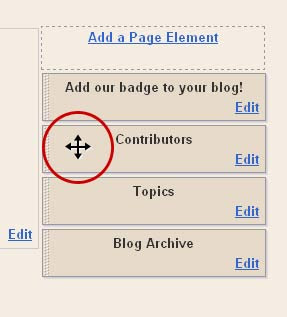
STEP FIVE: DRAG YER BLOK TO WHATEVER POZISHUN YOO LIKE. Back in the widjit template page, yoo can drag yer new element to whatever pozishun yoo like. When yoo mouse over an element, a cross thing will appeer, wich allows yoo to drag and drop yer elements. Once yer done, clik to save and that's it!

Sunday, February 18, 2007

How to I git a kustom grafik to show up on the Top 100 Cat Sites?

Many of us are now listed on the Top 100 Cat Sites Site, and my best frend Jeter Harris was wonderin' how we got owr custom grafiks to display insted of the five star sistem grafiks that show up by defalt.

Heer's an example of a custom and a sistem grafik:


To start, yoo'll need to make a grafik. Heer are the gidelines:

  • Yoo'll need to have yer image uploded sumware like photobucket or yer catster foto album or sumthing similer.
  • The image must be 88 pixels wide and 31 pixels tall.
  • Yer image can be a gif or jpg.

To uplode win yoo ferst join, paste the URL of yer image in the BANNER URL feeld as shone beelow (yoo can klik to biggify):


If yer alreddy a member, click the EDIT INFO link in the top menu, and paste the URL of yer image into the BANNER URL feeld as shone beelow, then enter yer passwerd and klik submit:

That's all thare is to it!

Saturday, February 17, 2007

Emale Notifikayshun Services of Blog Updates

My deer frends Dazey, Jesse & Conner Cloud ask:


Skeezix,

How do we get a box for beans (like our granma) to get an email when we blog?

Thanx
d
j
cc

I've had a box for Blogarithm on my site for sum time. I wasn't shur it was werking, but I reesintly set up a test and was abul to suksessfully git an emale alert win my blog was updated. It's nice becuz it also provides an extrakt of yer post as well as a link to it, and it offers a seemliss way to forward the blog post - not just the kerrunt one, but also many of yer reesint posts. GO HEER to set up a blogarithm notifikayshun.

Win yoo submitted yer qweschun and did sum reeserch, I also fownd Feedwhip.com thru wich yoo can set up up to five alerts for free. It sends all the text frum yer blog entry (but not non-text content), wich is not so good if yoo wunt to git traffik coming to yer blog.

Neether Blogarithm nor Feedwhip send notises rite away, but they go owt the same day yer blog stuff is posted.

Thare's also a service wich will send an IM when a blog is updated. Go heer for deetales... altho yer granma probly isn't on IM...

Anybuddy else got any notfikayshun services they've used suksessfully?

Thursday, February 15, 2007

Paying for the Cat Food

I know that there are a number of folks out there who blog about their cat who need a little extra income. I see a lot of cafepress stores. Did you know you could become a cafepress affiiate? For instance, if you love what the Cat Blogosphere has done, if they are open to affiliates, you can link to their store and if you have a cafepress affiliate number, you can get a few cents for every sale they make if the people click off from your blog.

Another you think you can do is offer adspace on your blog. I believe that google allows google adsense on blogger blogs. It's easy to sign up for and you can display them on your blog. Another company that sells adspace is called adbrite. They set you up with advertisers who pay a certain amount a month to advertise on your site. How much they will pay depends upon the amount of traffic you get that is targeted to the audience that your advertiser wants to target.

Another easy affiliate to work with is Amazon.com. They have amazon shops, like I have at Chey's Place. They also have links that look at what you are writing about and then automatically generate a product that might fit in with your content. There are lots of places that offer affiliate networks and whether you are eligible with a blogspot blog depends upon each companies policies. Many of them do require you to have your own domain name.

This is just a very brief overview of some ways to make a little extra from your blog. There are many different blogs out there that are just devoted to different ways to make money from your blog, so this is far from inclusive. On that I recently heard about was Mike's Money Making Mission. Mike isn't an internet marketer who invested anything in making money from his online activities, so basically all he has done is spent some time. It has some great ideas and for those who have more time than money, it might be an interesting read.

Monday, February 5, 2007

New Blogger: Can't uplode fotos

My best frends Jake and Bathsheba rite:

Skeezix, our Mom is so upset right now that she's almost ready to make us stop blogging--and we're on the cusp of our 100th post! We were switched to new blogger over the weekend. We don't know if this is related or not, but something is preventing her from being able to post photos--and it's not like Jeter's problem. It's probably an internal computer problem (um, Dad messed around with Mom's computer a day before we were moved to new blogger and he did stuff like remove cookies). When she clicks on the photo icon while making a blog post, NOTHING happens! It used to open directly into "my photos" and everything was simple. Do you have any idea what the problem could be? Help - or we may never blog again! So much for Man Cat Monday for Jake! ~J&B
Taking the path of leest rezistinse, I think win yer dad mest with yer mom's compyooter he mite have installd a pop-up blokker or a noo browzer with a popup blokker. Try this - hold down the Ctrl key wile yoo press the foto ikon. (Sumtimes, like in IE7, this also makes yoo do an addishunul step just beelow the tab area to enabul popups for eech site.)If that duzn't werk (or the uzhual steps yoo take to allow popups duzn't werk), lemme know and the Cat Blog Help Center Staff will do sum more investigayshun to git to the bottum of this!

And BTW, don't let yer dad mess with yer mom's compyooter!!!

Sunday, February 4, 2007

My bakgrownd duzn't show up in IE!

My vary speshul frend, Daisy the Curly Cat, rites:

I added a special Valentine background/wallpaper to my page. It shows up in Firefox, but not if you use IE. I can't figure this one out!

Daisy, it's a qwik fix:

1) In yer style sheet sekshun, go to ware yer body styles are --- the part that looks like this:

body {
margin: 0;
padding: 0;
border: 0;
text-align: center;
color: #555555;

background: #fff2fc top center repeat-y;
font-size: small;
background:url (
http://images.bigoo.ws/content/saint_valentine/background/sv_background_0.gif)repeat;
}

and reemove the style that's displayed in green above: background: #fff2fc top center repeat-y;

2) Then, skrole down past ware yer style sheet ends (</style>) -- abowt 6 lines down frum that is yer body tag. It kurrintly looks like this: <body>

Add this: background="http://images.bigoo.ws/content/saint_valentine/background/sv_background_0.gif"
So it looks like this:
<body background="http://images.bigoo.ws/content/saint_valentine/background/sv_background_0.gif">

That shood make it werk in both Firefox and IE!


Daisy asks anuther qweschun:

"I have just one other little question. Do you know how I can remove the little blank space at the very top of my page? It is only about 1/4" high."

Daisy, that's akshully an image wrapping the top of yer mast. To reemoove it, go to the OUTER-WRAPPER style in yer style sheet. It looks like this:

#outer-wrapper {
margin: 0 auto;
border: 0;
width: 742px;
text-align: left;
background: #ffffff
url(http://www.blogblog.com/moto_ms/innerwrap.gif) top right repeat-y;
font: normal normal 110% Arial, sans-serif;
}
and reemoove the line (in red above) that deefines the stile for yur wrapper bakgrownd image:

background: #ffffff url(http://www.blogblog.com/moto_ms/innerwrap.gif) top right repeat-y;

so that the outer-wrapper stile now looks like this:

#outer-wrapper {
margin: 0 auto;
border: 0;
width: 742px;
text-align: left;
font: normal normal 110% Arial, sans-serif;
}
Thare's still a space between yer header and the top margin, but I can't figyer owt how to make it go away. Reemooving the margin in the body tag didn't werk. But it did point owt a problim in yer HTML, Daisy...

Down by yer body tag, yoo have dooplikit body tags, and one is clozed owt beefore it shood be. It looks like this:

<body>
<div class="navbar
section" id="navbar"><div class="widget Navbar"
id="Navbar1"><iframe id="navbar-iframe" marginwidth="0"
marginheight="0"
src="http://www2.blogger.com/navbar.g?blogID=2240334138501910154"
frameborder="0" width="100%" scrolling="no" height="30"></iframe
>< div id="space-for-ie">

<body
background='http://images.bigoo.ws/content/saint_valentine/background/sv_background_0.gif'>
</body>
and the parts in red need to be reemooved!

Monday, January 29, 2007

Secret Paws: The Hows and Whens

The Cats Stephens asked about Secret Paws ... This is the answer that I posted in the comments with more info attached. If anyone knows MORE, please add your information in the comments of this post. DMM

Regarding "Secret Paws" ... You can visit the blog at Secret Paws or check with the organizers of the whole thing Diva Kitty and the Fluffies to find out more about the activity. As far as I know (the Feline Americans and I did this for the first time at Christmas), it occurs three times per year. Sign ups for April happen in March, sign ups for August happen in July, and sign ups for Christmas happen in November. It might be a good idea to visit the Secret Paws site and let Sophia (or Fiona Bun) know that you'd be interested in participating in the next round.

Secret Paws is open to any animal (and even includes some young children). A price limit is posted (usually $7 - $10) and doesn't include the price of packaging or postage. International "paws" are encouraged and there are always a number from Europe and Australia/New Zealand.

To participate, you email your name, your human's name, email address, home address, gender, and type of animal that you are. You can also specify who you'd like to have as your "paw": woofie, feline, bunny, etc. If you have a favorite color, type of treat, or have an allergy, you should specify that, too.

You can also choose to have a Shelter Pet as your Secret Paw or you can make a contribution of a gift card or some yarn so that Diva Kitty and the Fluffies' mama can make crocheted blankies for them.

After the registration process closes, you'll receive an email with your "paw," his/her preferences, and where to mail the Secret Paws package. When you receive your package of gifts, you open it in front of your humans so that they can take photos for you to post on your blog.

Since there are six of us, we divided ourselves into two groups of three and selected two kitties as our recipients (Maximus and Lucinda). We, in turn, got two Secret Paws presents (from Darling Millie and from Victor Tabbycat & Bonnie Underfoot).

We made sure that we mailed our presents by December 15th so that they'd arrive in time for Christmas. We're not sure if there's a specific time that they have to be mailed in April and August, but we'd assume that the presents should arrive before April 30th and August 31st.

Secret Paws is a lot of fun. It builds community in the blogosphere and also gets more traffic to your blog. Efurrybody should join! We're gonna (and so is Shadow Saluki and our cousins Suzanne and Ben). You can see our Secret Paws photos on our blog: DaisyMae Maus and the Feline Americans.

I hope that this helps and that you'll consider participating in March/April!
DMM
Cat Blog Help Center technician

Blogger is forsing me to konvert to new Blogger!

This last week, a lot of us hoo've bin on old Blogger have bin forst to konvert to New Blogger withowt having the option of going in and saving owr existing templates in case sumthing got skrewd up in the konverzhun. This made a lot of us nervus.

Having no other choice, I switched over (I save my templates evry kuppul of weeks, so I wuzn't sooper nervus, just a littul nervus). My blog was swicht over with no problims or chanjes. The only diffrinse is that now I can add labels (YAY!).

However, my blog didn't git the new wijit innerface, so I suspekt I mite have to chooze a noo templit or sumthing to git this new teknolojy.

Pleeze share yer ixpeerienses and any problims yoo enkownterd in the comments feeld...!

Saturday, January 27, 2007

How do I link to Oreo's Store?

Munchkin, Missy and Monte rite:

Skeezix, I want to add the link to oreo's new shop to my sidebar. Could you please help me with it?
This is exactly the same as linking a badge (see the post beelow), only the URL will point to Oreo's store (http://www.cafepress.com/oreosmith).

To get the path pointing to Oreo's store grafik, rite klik on the grafik yoo wunt to use. (I used the ferst one on yer Jan 26th post.) In the menu that pops up, selekt "Properties" wich is at the vary bottum. Then, in the Properties dialog box, the 3rd provides the adress of ware the grafik is. Selekt the hole URL http://photos1.blogger.com/x/blogger/345/1325/320/383425/1.jpg

Now, just paste it into yer sidebar ware yoo wunt it to appeer! If yer on the new blogger, yoo'll need to add a page element, and chooze the "HTML/Javascript" widget:


And IN EDIT HTML MODE (not rich text mode) paste the code into the form and save.

If yer on the Old Blogger and/or do not have the widget interface, paste the following code into yer template in the sidebar sekshun ware yoo wunt it to appeer:

<center><a href="http://www.cafepress.com/oreosmith" target="_blank"><img alt="Oreo's Store" src="http://www.skeezixthecat.com/images/catbloghelp/oreosStore.jpg" border="0" /></a></center>

NOTE: Munchkin, Missy and Monte reported having a problim ware the code above still did not werk. So, I did sum testing. Thare appeers to be a blogger bug in the widget wich skrews up the code once it is saved --- win I re-opened the widget, the code was much diffrint and all shifted arownd frum whut I pasted in. So I repasted new code, and I used a diffrint image lokayshun, and evenchully it werked and the code was saved in the korrekt format. I did not encownter any problims pasting into a template direktly. Yoo can see an ixzampul on Rocky's Blog.


Thursday, January 25, 2007

How do I get a badge up on my blog?

My best frend, Jeter Harris, rites:

deer skeezix ... (or anycat on da help teem)
i am tryin an tryin to put da badge dat lux gave me fer da honorabul menshun on mi blog. i copied it an put it on mi catster paje so i would hav a code ... but no matter wut i do ... i can't figyer owt how to put it on mi blog. i am a old blogger, btw.
pleez help me.
thank u.
yerz troolee--jh
Jeter, klik heer for yer code. Yoo'll just copy and paste it into the area of yer template ware yoo wunt the badge to appeer. (For thoze of yoo in noo blogger with the widget-based template, use the HTML/Javascript widget box.)

Basikly, yoo need to create 2 links: an image link (so they'll see yer image) and the link to the six werd story blog. The image link will be in the middle, with yer link tag contayning the URL yer linking to at the beginning and a clozing link tag (</a>) at the end:

<a href="http://sixwordcatstory.blogspot.com/2007/01/six-word-contest-entry.html"><img src="http://files.dogster.com./pix/cats/02/214902/214902_1169678480.jpg" border="0" > </a>

Yoo'll find more info on the HTML yoo'll use HEER and HEER.

Wednesday, January 24, 2007

How do I add + and - sines next to blogrolls to expand/close?

My best frend Lux asks:

I've been having trouble trying to set up other blogrolls on my blog, i.e., PhotoHunters blogroll + Wordless Wednesday. I'm using the New Blogger, and what I'd like is to have those + and - signs next to the blogrolls like I've seen on other sites. Can anybody help me?

If yoo'll go to http://www.skeezixthecat.com/bloghelp/expandMenu.html, I've provided two examples, and snippets of the code yoo'll need to implement eech.

The example shows the blogrolls for WW and Photo Hunters, but yoo can substitute or add new blogrolls eezily by replacing thoze blogroll scripts with the blogrolls (or list of links) yoo wunt to display.

How to Add Video to Yer Blog

Icon Baxter-Bentley asks:

"How about how to add a video to your WordPress blog? I need help with video, but if I figure it owt myself, I'll be sure to post abowt how I did it."
Good qweschun, IBB! This anser mite need addishunul explanayshun frum the WordPress gurus on staff, but I'll walk yoo thru the eeziest way to git a video up on yer blog, and that's by posting it direktly from YouTube.com.

After yoo've uploded yer video to youtube, click yer video's thumnale in yer thumnale list (yoo can klik any of theeze screenshots to biggify):

This takes yoo to the page for that video. Click the Post Video link in the box beelow yer moovey:

Yoo mite git a Post to Blog box. If yoo do, klik the Edit Blog Settings link:

On the Blog Settings page, klik the Add a Blog/Site buttun:


And on the Add a Blog/Site skreen

  1. Selekt yer service (in yer case, eether WordPress or WordPress Slef-Hosted frum the dropdown;
  2. Enter yer username and passwerd for yer blog;
  3. If yer on WordPress Self-Hosted, yoo'll also need to provide yer API URL and API Key.
  4. Klik Add Blog buttun.


(I don't know abowt the WordPress API stuff, so maybe Chey or sumbuddy cood provide more info on how to find that.)

Once yoo've added yer blog, yer set. Go bak to the skreen yer moovey is on, and after klikking the Post Video link, yoo'll be prompted to chooze the blog, add a title and text. Win yoo klik the Post to Blog buttun, it will automatikly send the videeyo to yer blog! It will take a cuppul of minits to show up.


But yer not dun, yet!
For sum blogs, the deefawlt width of the videeyos is too wide -- cauzing the sidebar to be pusht down to the bottum of the page. But it's an eezy fix. Go to yer blog once the video has bin posted, and in EDIT HTML mode, change the height and width attribyoots (they uzhully appeeer twice). I change them to a width of 300 and a height of 247. That's arbitrary -- yoo can change to whutever dimenshuns fit yer blog the best!

Monday, January 22, 2007

My Comments are being overtaken by Mr Anonymus!

Owr best frends Rosie and Cheeto rite:

I switched ovur to the new blogger and almost all of my comments show up as anonomous. We don't know who this anonomous guy is but he's hawging our cat
friends comments. What do we do!?!

This is a tuff one. Sumtimes, win thare are problims with Blogger's comments, it becomes impossibul to sine in and leeve a comment unless yoo do so anonnymussly. This is maybe whut happend on yer blog. This was a BIG problim win noo Blogger came owt. Mao had that problim for a wile win he swicht over frum old Blogger to noo Blogger... with him, only noo Blogger users cood log in to leeve comments on his blog, so evrybuddy else had to leeve comments as anonnymuss. After a wile, it started werking okay agin.

We did a cuppul of tests tonite, and it seemed like we cood leeve comments on yer blog withowt a problem using both new Blogger and old Blogger signons, so I think we wood rekummend that yoo wate and see whut happens over the next cuppul of daze. If yoo still have the problem, yoo can change yer comments settings so that only rejisterd uzers can leeve comments --- but this leeves all non-Blogger cats unable to leeve comments at all, so it's kind of a last reezort...

If yoo hit the Settings tab, then klik the Comments link, yoo can change yer comments settings. In this case, yoo wunt to change it from "Anyone" to "Only Registered Users" (see below):

This will make it impossible for anywun to leeve comments anonymussly --- but it also meens that only users with Blogger IDs can leeve comments.

The staff of the Cat Blog Help Center will kontinyoo to moniter the sichyooayshun and see if we can find owt more info on why this is occurring!

Permalinks

When yoo leeve a link to yer blog in a Mr Linkie's box or in comments on a Thursday Thirteen or similer meme, do yoo leeve a link to yer blog, or do yoo leeve a link to the spesifik post? If yer leeving a link that just goze to yer blog (i.e. http://myblog.blogspot.com), yer doing a desservise to the blog commyunity. Yoo shood link to the spesifik post so that win sumwun is klikking on the link weeks later, they see the appropreeyut blog entry rather than the top of yer blog (wich can be frustrayting). The link to a spesifik post is called a permalink.

Heer's the deffynishun of "permalink" frum Wikipedia:
A permalink is a URL that points to a specific blogging entry even after the entry has passed from the front page into the blog archives. Because a permalink remains unchanged indefinitely, its use avoids link rot. Most modern weblogging and content-syndication software systems, including Wordpress, Movable Type, LiveJournal, RapidWeaver, Pivot and Blogger, support such links. Other types of websites use permalinks, too, but the term itself is most common within the blogosphere.

How do yoo know whut the permalink is? I'll provide the info heer for Blogger, and deepend on others to provide instrukshuns for the other blog platforms...

The qwikest and eeziest is to go to yer blog and look in yer sidebar for the area ware yer preeviyus posts are listed. Klik on any link (or rite-klik and vyoo properties) to take yoo to the URL for that post. Heer are 2 ixzampuls of arkived posts lists:


Or, yoo can go to ware yer list of posts is (under "Edit Posts") and klik the vyoo link wich is in the frunt of evry post titul. It looks sumthing like this:

Just klik the View link and grab the URL frum the adress bar, or rite-klik the View link and View Properties to see the link.

If yoo git in the habit of leeving permalinks insted of just the general adress for yer blog, yoo'll grately improove the ixpeeriense for the cats hoo are klikking on links!


Saturday, January 20, 2007

Popping up a noo window

Tooday we'll lern abowt target="_blank".

Altho we all have lots of links on owr blogs, we reely don't wunt owr reeders to LEEVE owr blogs. That's ware it comes in handy to be abul to pop open a new window for links that are owtside yer website. That way, yer reeders can go to the owtside links, but still eezily reetern to reeding yer blog win thare dun.

To make yer link pop up in a noo window insted of staying in the existing window, add target="_blank" to yer link, so that yer link looks like this:


<a href="http://www.newlink.com" target="_blank">

If yoo use blogrolling.com, yoo can add the target="_blank" in the edit form. In the target feeld, tipe _blank. Eezy, huh?

The windows that pop up from the target="_blank" attribyoot are not uzhully blokt by popup blokkers.

Friday, January 19, 2007

Help! My sidebar has shifted to the bottom of the page!

Brandi rites:

Dear Skeezix,We have had a real problem for several days, and mama can't figure it out. First, we are on old Blogger. Now the problem: the posts have eatten space on our blog, and the sidebar has fallen way below, so you have to scroll way down to see anything on the side bar (including your CatBlog HelpCenter). We want them side by side! Please remember, mama isn't all that computer smart with codes and stuff.Help!!

Thanks!brandi

Good qweschun, Brandi! This one's eezy! Go to yer "BRRRRRRRRRRR..." post and edit the title to reemoove abowt haff of the "R"s. Republish and yoo shood be fine.

When yer sidebar no longer appeers beeside yer mane kolum, it's almost always becuz sumthing in one of the kolums has made the kolums too wide to sit side-by-side. Whut happends is that the width of yer blog is spesifide in the layout. Let's say it's 800 pixels, and the mane kolum is 600 pixels and the sidebar is 200 pixels. If yoo put in a grafik that's 300 pixels wide in the sidebar, it forses the sidebar to be 300 pixels wide. Now it won't fit within the spesifide bowndaries of 800 pixels for the width of the hole blog, so it shifts the overflow downward and the sidebar appeers at the bottom.

Think of it as trying to sqweeze into pants that are too small (good post-Krissmiss analojey, rite?) If yer a size 12 and yer trying to sqweeze into size 10 pants, yoo mite be able to get them on and zip them up if yoo don't try to do sumthing silly like breethe, but what mite happen is that a roll of flab mite spill over the top of yer wasteband.... it's gotta go sumware! (Not that anything like this has ever happend to the Food Lady, I'm just givving an exzampul. So don't rat me owt for blabbing, Mao!) If yoo try to sqweeze sumthing too wide into the sidebar, it won't fit, and the sidebar will shift to an area ware it will fit --- underneeth yer mane kontent area.

The reezin that yer "Brrrrrrrr...." post is kawzing a problim is that strings of letters withowt spaces will display in HTML withowt a line brake, so the extra Rs are forsing the sidebar to stretch beyond the width it's suppost to be. If yoo wunt it to fit korrektly, either deeleete sum Rs or add a space in the middle of the Rs so it rapps.

HTH!

Thursday, January 18, 2007

Polls!

Polls are a grate way to make yer site more inneraktive. Withowt knowing a lik of code, yoo can ask intristing qweschuns of yer viziters. Everybuddy likes to give thare opinyun on stuff! And many are free.

My faverit is vizu.com. They allow yoo to insert pickchers and it's a pritty slik interface that's eezy to customize. Heer are three popyooler blog pole providers:

Monday, January 15, 2007

Word Verification: Settings for Comments

This is just a personal preference on my part ...

Blogger Users:
I have noticed that cats (and others) who have disabled the "word verification" function in their comments settings tend to get more comments.

Personally, I prefer NOT to have to type the colored string of letters before I can post my comment. I understand that the "word verification" feature is supposed to keep the riff-raff from leaving a plethora of long-winded and profanity-strewn comments, but considering the fact that we ... the blog authors ... can just delete the unwanted comments, what's the point of forcing legitimate commentors from typing that pain-in-the-neck string before posting their thoughts?

If you have a similar mindset to mine, you can find the disable button by choosing "customize" from your dashboard, finding the "settings" tab, choosing the "comments" link, and then choosing to disable word verification. You might find that your comment numbers increase because visitors can just dialog and dash ...
DMM

Sunday, January 14, 2007

Squidoo: Another Way to Advertise

While catster is a social site, Squidoo is more of an advertising site. It can be social, if you visit other people's lens.

Squidoo is a site where you can create a page on your favorite topic, such as, umm.. YOU. I made one on me. People from squidoo can come visit it and then perhaps come visit your blog. You can earn some pennies if people click on links on your page and you can even choose to give them to certain charities. We've requested that they add Best Friends, but they haven't done that yet, but we requested just back in December. We got a very nice prompt response.

Creating a lens or page on yourself at Squidoo allows you to tell more people about you. This is especially important if you have things on a blog that you want to sell, like cafepress products. The more people who see them the more you will sell. Also, because you can make some money if people click on your amazon or cafepress links right at Squidoo, you can make money there too! We made .35 cents last month! We made .35 cents for Ecotrust and .16 for the Humane Society. Okay so we aren't getting rich, but .35 cents is .35 cents and I didn't see the Human Society rejecting their .16 cents!

If you just want more links to your blog, this can help too. You will get more visits if you participate in lens groups. We have one for cat bloggers if you want to join. If you blog isn't listed--and we got tired--you can always let me know on Squidoo that you'd like to be added. And if you have your blog listed in the cat bloggers group, let us know if you'd like us to promote one of your cafe press products too!

It's interesting to wander around there and see what people have come up with.

Change or Delete Blogrolling.com Links

Here's how yoo can change or delete linkies on yore blogroll at blogrolling.com.
(Note: These instrukshuns are only fur yoo if yoo has yore own blogroll at blogrolling.com. If you's using Skeezix's blogrolling.com code or sumcat else's, yoo gots to email them to ask them to change anyfing on their blogroll.)
Go to www.blogrolling.com

Click Login (under Navigation on the left side) and it takes yoo to a login page.

Enter yore email yoo signed up wif, and yore password, and click the box that says Login.

That'll bring yoo to a page that looks somefin like this:
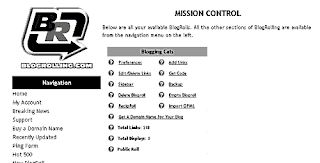
Look under the name of yore blogroll (I named this wun Blogging Cats) and find Edit/Delete Links.
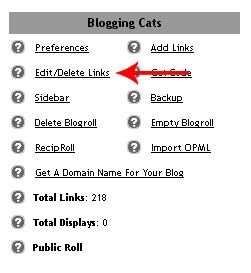
Click Edit/Delete Links and a list of all the links on yore blogroll will appeer!
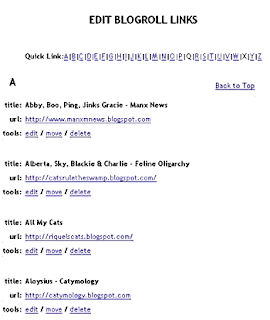
They's all on one page listed in alfabetikal order by what they linkies are named.

Yoo can click the furst letter of the name of the linky in the bar at the top of yore blogroll there, or yoo can scroll to go down the page and find the linky yoo wants to change or delete.
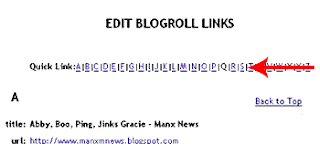


Note: This can bee tricky. Fur instance, sumcat haf my bloggy I share wif my sisfurs n brofur listed under House of the (Mostly) Black Cats and sumcats haf it under Boni Maroni and sumcats haf it under Sanjee. So if yoo can't find the linky under one name, yoo might hafta scroll down the list if yoo can't reemember how it's named in the blogroll or check yore bloggy to see how yoo named it.

Once yoo haf found the linky yoo wants to change or delete, choose the thing yoo wants to do next to tools: Edit / Move / Delete

Delete a Link

Fur instance if yoo has two linkies to the same cat by mistake like shown heer, or if somecat doesn't haf a blog no more. Reemember tho, yoo can't undelete a linky! You has to add it all ofur again like noo if you wants it back!

To delete the linky, you click delete next to the linky yoo wants to delete.
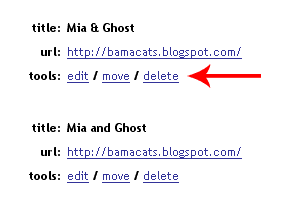
Then yoo gets a screen like this:

If yoo deffinitely wants to delete it furever, Click Yes, dump it.

And it'll take yoo back to yore list of linkies in case yoo wants to delete or edit more linkies.


Change a Link

To edit or change the linky, like if yoo wants it to haf a noo name or if yore furriend mooves their bloggy to a new place, click edit and yoo'll git a screen like this:
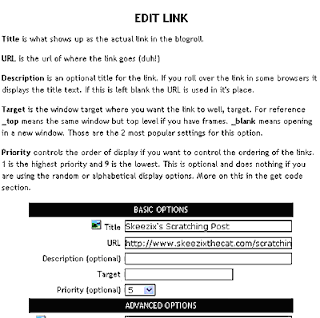


Then yoo can change the Title or the URL (web address) n stuff by clicking in the box where the stuff is yoo want to change and typing in the noo stuff. (Yoo can also change the advanced options stuff at the bottom if yoo knows what to do there.)
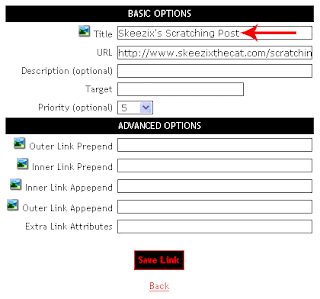

And when yoo've changed the stuff you want, yoo click Save Link there at the bottom. That takes yoo back to yore list of linkies so yoo can edit or delete more linkies if yoo wants, or yoo can go somewhere else on the inner net now.

Hope dat helps!
Purrrrrrrs,
Sanjee

Saturday, January 13, 2007

Catster!

Catster is sort of a "MySpace" for cats (thare's a similer one for dawgs called Dogster). But Catster is WAY better than MySpace becuz:
  1. It's all cats, all the time.
  2. Yoo don't git emales frum collije gerls with webcams
  3. Lots of grate groops and forums to partisipate in
  4. Yoo can meet lots of grate noo frends!
  5. If yoo wunt to join FOS, yoo need to join Catster.
Joining Catster is free. Yes, that's rite, it's free. But yoo mite wunt to save yer allowinse and get a Catster-Plus membership wich lets yoo store a bunch more fotos and give rozettes and stuff like that.

On yer profile, yoo can put videeyos and fotos, and keep a diary, and lots of neet stuff. Even if yoo don't have a blog, this gives yoo whut's called an "online presinse". It's grate. Yoo shood try it!

>> Go to Catster

Friday, January 12, 2007

How to set up separate profile piks for multiple blog contributors

My best frend Mattingly asks:


I've had this question for a time and had trouble finding the answer. It didn't get easier with the new blogger either. If there is more than one contributor to a blog, is there a way to have both pictures along with profiles show up in the profile box? Or do we just need to add our own pictures, text, and link to the profile? We appreciate any help! I'm going to make my blog a joint blog with Harlie.

I'm gonna go owt on a limm heer becuz between me and my big bruther Mao and Rocky, the blog setups are diffrint. But take for ixzample this blog. We have many kontribyooters. This was set up under Rocky's blog (since he was on the new blogger), and he invited new kontribyooters, hoo all have thare own logins and profiles. So theeze instrukshuns are for NEW BLOGGER.

I rekummend yoo set up a blog and invite Harlie as a kontribyooter, that way yoo can eech have yer own profile.

To invite a new contribyooter to a blog yoo've set up:

  1. From yer dashbord, klik the Settings link (top left beneeth the dashbord hedding) for yer blog.
  2. Klik the "Permissions" link under the tabs at the top - it's the far rite link.
  3. Klik the bloo Add Authors button
  4. In the "Invite more people to write to your blog" box, enter the adress of the cat yoo wunt to invite.
  5. Klik the orange INVITE buttun.

Once Harlie is invited, she'll git an emale and be promptid to set up her profile. To add a pikchur, she will:

  1. Go to the dashbord and klik the "Edit Profile" link at the top of the right sidebar.
  2. Skrole down neer the middul of the Profile skreen to the "Photograph" sekshun.
  3. In the feeld next to Photo URL, enter the path of yer profile foto (yoo can't uplode like yoo do frum yer blog posts; it has to be hosted sumware).
  4. Skrole to the bottum of the skreen and klik the orange "Save Profile" buttun.
That way, yoo two can both kontribyoot to the same blog, but under seprit identiteez.

(I'm werking on gitting skreenshots for this one!)

Now I have to reeserch wether yoo can do that with the old Blogger!

What is a style sheet?

My best frends Dazey, Jesse & Conner Cloud ask:

In reference to removing the blogger bar at the top, what xactly is the "style sheet"?Skeezix, we and the Mom that Lives here Looked but didn't figure it out. Is it the template? Can you clarify?? Thanx Skeezix, we luvs this cat help blog!
That's a vary good qweschun!

I'll deskribe ware the stylesheets are in blogger, and sumwun else can chime in with info for Wordpress and others.

The style sheet is the code that appeers in between the HEAD tags of yer template. If yer using the new (beta) Blogger, the ferst part of it looks like this...


---------------------------------
Blogger Template Style
Name: Rounders
Designer: Douglas Bowman
URL: www.stopdesign.com
Date: 27 Feb 2004
Updated by: Blogger Team
--------------------------------- */
... and continues until yoo see the </head> tag.

In the old blogger, the style sheet falls between the style tags --- starting with <style> and ending with </style> (and the closing style tag is just above the closing head tag).

So, the stylesheet is the part of yer template that deefines the formatting and layowt of all the elements in yer template. Win they occur in yer stylesheet, it enabuls yoo to change, say, yer font color, in one place, and in changes the font colors thruowt yer blog or website. It's vary powerful, but it's also vary mistifying if yer not a tek-hed.

CSS is the abreeviayshun for "Cascading Style Sheets," wich is the term for the languaje of stylesheets.

We will rite fyoocher artikuls on using stylesheets in yer blog. But for now, all yoo need to know is that the stylesheet is the code at the top of yer template that makes yer blog look the way it duz!

MORE INFO:

>> Klik heer to find owt more abowt style sheets.
>> Try CSS yerself (grate tool for playing arownd with the code and see whut it duz.)
>> More on CSS frum Wikipedia

WORDPRESS: Free Themes

KLIK HEER for a place ware yoo can git neerly one sqwillion Wordpress themes.

Thursday, January 11, 2007

How do I put a picture at the top of my blog?

Victor Tabbycat rites:

Ok, here's one. How can we put a pictor at the top of our blog instead of the boring tidal box? Fanks!

That's a hard qweshchun to answer VT, becuz it depends on what blog platform yer on, and whut template yer using. Whut I can do is show yoo how I made the banner at the top of this blog.

ALWAYS BAK UP YER TEMPLIT BEFORE YOO START MESSIN' WITH IT.

LEVEL OF DIFFIKULTY: Intermeediyut +

Konsepchewully, yer going to make a bakgrownd grafik that the text in yer hedder sits on top of. Yoo don't wunt to make evrything (inklooding the text) a grafik, becuz the serch enjines will have trubble indexing yer blog.

So whut I did wuz change the styles for the hedder-rapper (this is using the New-Blogger platform). It now looks like this:


#header-wrapper {
background:
url("http://www.skeezixthecat.com/images/catbloghelp/banner_cbhc.gif")no-repeat ;
text-align:right;
height: 188px;
repeat: no repeat;
margin:22px 0 0 0;
padding:8px 0 0 0;
color:$titleTextColor;
}
Heer are all the things I did:

  1. Added a bakgrownd image and set it not to repeat.
  2. Spesifide the height of the wrapper, wich is IXZAKTLY the same height as the graphik (188px;). (If yoo don't do this, it gits mest up.)
  3. Changed the text so that it a-lines on the rite, and I diddled with the margins and padding so that the text is a-lined korrektly atop the bakgrownd grafik.

get involed

Hi all it Lilly Lu and IrisWe want to tell you about some great places to join on line. The first one is caster. You can get your own bage and join groups. Includeing are very own FOS feinds of skeezix. We luff this group!!!!

also there is catnip annoumous Mu shue need this group he has a slight problem wiff the nip

also there is Grorous gingers Mu shue luff this gang he calls them his ginger best freinds

we find by just getting invloed you trafic will go up and you make new freinds.

become Kat of the day

Fun add on extras

have you even noticed on the side bars or on in the blog pepole have added extra like a pet or a slide show or a clock I am here to tell you about some fun free Html extra You need to know no html just copy and click and go to add HTML and put them in

the frist one is hugs. I luff hugs becuse you can never have enough

Add a litte bling to your blog with glitter graffics

Next you can add a slide show of your self and other cats here or two good programs

The frist is slide.com

the next one is flimloop.com

Have you even noticed in the top left conner of some blogs there is a little cat this is called Neko

You can add a clock to your side bar and ask is it time to eat yet

You can also adopt a pet of your own I adopted Prince Mu shue jr. This is fun becuse you can make him your own by changing the color

Wednesday, January 10, 2007

BLOGGER: How to ditch the blogger banner at the top of yer blog

Paste the code below at the bottom of yer stylesheet in yer template, immediutly ABOVE this: < /style >

OLD BLOGGER:
#b-navbar {height:0px;visibility:hidden;display:none}
body {margin-top: 18px !important}


NEW BLOGGER:

#navbar-iframe { height: 0px; visibility: hidden; display: none;}