If yer new to blogging and are trying to figyer owt wich platform to use, I fownd a good deskripshun of the pros and cons of Blogger vs. Wordpress.
KLIK HEER to reed a good summayshun of the relative merits of Blogger and Wordpress.
Showing posts with label blogger. Show all posts
Showing posts with label blogger. Show all posts
Wednesday, October 3, 2007


Monday, September 17, 2007
Can one gmail account have 2 blogs?
Laura rites:
Akshully, Laura, it's eezier than yoo think. The post beelow (wich ansers a similer qweschun that Jeeter askt) deeskribes the process. But let me ixplane a littul bit more....
When yoo set up a blogger (blogspot) blog with a blogger ID, the blog and ID are linked but not exkloosively so. The cat hoo orijinully set up the blog will be the administrayter (meening s/he can chanje the layowt and add new awthors), but addishunul awthors can be set up for any blog. And, a singul blogger ID can set up many other blogs and add many addishunul awthors to thoze blogs.
And, the orijinul blogger accownt under wich the blog was set up need never be used for posting.
So, say Buddy's blogger accownt was set up under the emale adress nezbine@gmale.com. And say thare are two blogs set up under that accownt (the blogs yoo see win yer in yer accownt dashbord):
Accownt: Nezbine.blogspot.com:
Hi Skeezix,
Can one gmail account have 2 blogs?
When I set up Buddy's blog (Nezbine.blogspot.com), I used my gmail account & used her name for the blogger part. Now I want to make my own blog, and I did create a test one, but I can only post to it as Buddy (nezbine). Is there a way I can create my own blogger account without deleting hers or messing it up? If I modify it so it's me instead of her, then her blog will have my picture & stuff from the profile page, instead of her info. That would bother me.
Laura
Akshully, Laura, it's eezier than yoo think. The post beelow (wich ansers a similer qweschun that Jeeter askt) deeskribes the process. But let me ixplane a littul bit more....
When yoo set up a blogger (blogspot) blog with a blogger ID, the blog and ID are linked but not exkloosively so. The cat hoo orijinully set up the blog will be the administrayter (meening s/he can chanje the layowt and add new awthors), but addishunul awthors can be set up for any blog. And, a singul blogger ID can set up many other blogs and add many addishunul awthors to thoze blogs.
And, the orijinul blogger accownt under wich the blog was set up need never be used for posting.
So, say Buddy's blogger accownt was set up under the emale adress nezbine@gmale.com. And say thare are two blogs set up under that accownt (the blogs yoo see win yer in yer accownt dashbord):
- Nezbine.blogspot.com
- Laura.blogspot.com
Accownt: Nezbine.blogspot.com:
- Buddy (nezbine@gmale.com - the administrator and sole awthor)
- Buddy (nezbine@gmale.com - the administrator)
- Laura (laura@yahoo.com - an awthor/contributor)
Once yoo add yerself as an awthor to the "Laura" blog, you can post with yer name. What will happen once yoo set up yer emale adress with permisshun to post, is that yoo'll git an emale frum Google to validate yer adress and yoo'll klik the link to compleete the process, and then yoo can set up yer compleete profile with pikchers and evrything.
The post beelow ixplanes how to set up permisshuns wich will enable yoo to have yer own blogger ID - even if it's with an ixzisting blog!
(Thinking abowt Buddy makes me sad, but I'm happy she had a good long life with yoo.)
FOLLOWUP QWESCHUN:
Laura asks:
When I set up Buddy's blog, I used my gmail address, but she had(s) her own email address. Can I add that and reassign ownership somehow? Her picture/profile is connected with my email address rather than her own. Is that making any sense? I know I know, I totally botched this when I did it. (Slapping forehead)
What I wood do is:
1) Add her as an awthor to her blog using her emale adress (not that it matters, but still, I'd probly do that), then
2) Sine in to blogger with yer emale adress and edit the profile so that it has yer foto.
The problim is that the profile on her blog wood then show YOO, so I wood deelete the page element on her blog that contanes the profile and add a new element (pik the HTML/Javascript one) wich will allow yoo to add a foto and the profile manyully.
Monday, September 3, 2007
Deleting Spam Comments on Blogger
When you get an icky spam comment (or any kind of icky comment you wanna get rid of) you want to know how to delete the spammy or icky comment even if you don't have comment moderation turned on. Here's how you do it in blogger:
1) Log in to your blogger account.
2) Go to the post that has the icky comment the same way you'd go to read cool comments.
3) The comments page part may look one of these two ways below, but that's ok!
Look for the lil trashcan icon that's with the icky comment and click that.
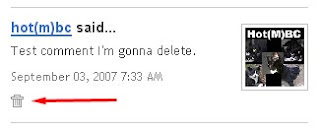
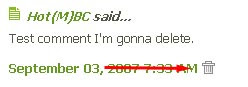 After you've clicked the lil trash can by the icky comment, you'll see this.
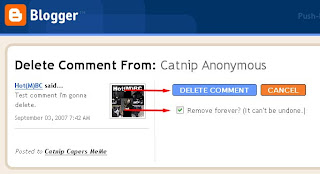 5) Check the box next to "Remove forever" and then click "Delete Comment".
Checking "Remove forever" makes it vanish like there never was an icky comment at all, so that's good.
6) Once you've done that, you see this, and you're all done!
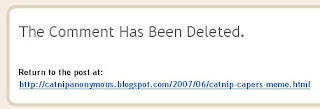
No more icky comment! Woo hoo!
1) Log in to your blogger account.
2) Go to the post that has the icky comment the same way you'd go to read cool comments.
3) The comments page part may look one of these two ways below, but that's ok!
Look for the lil trashcan icon that's with the icky comment and click that.

 After you've clicked the lil trash can by the icky comment, you'll see this.
 5) Check the box next to "Remove forever" and then click "Delete Comment".
Checking "Remove forever" makes it vanish like there never was an icky comment at all, so that's good.
6) Once you've done that, you see this, and you're all done!

No more icky comment! Woo hoo!
Sunday, June 3, 2007
How to Customize yer Blogger Hedder
Thare's a reely grate tootorial owt thare on how to kustumize yer blogger hedder and put images in it. The Blogger teem added this feecher a cupple of weeks ago, and blogger Ryanne made a screencast to show evrybuddy how to do it! KLIK HEER to see the screencast.
Tuesday, February 20, 2007
How to add Sidebar Content
My noo best frend Oreo the Cat asks:
STEP ONE: GO TO THE WIDJIT INTERFACE TO MODIFY YER TEMPLATE. To do this, go to the Template Tab, and klik the Page Elements link:
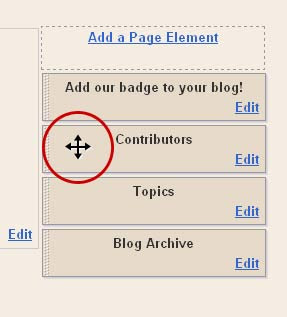
I dont get how to post icons to my side bar of my bloggie...like the one for the bloggie party.....where do you post the code for the thing to appear in the sidebar!Oreo, I'm assooming yer qweschun is abowt New Blogger's widjit interface. (If not, pleeze klarify yer qweschun in the comments feeld of this post.) With noo blogger, altho yoo can modify yer template direktly, whut yer prompted to do by deefawlt is use the widget interface to add and deleete content frum yer template. This reqwires a lot less HTML knowlidge on yer part (although going to modity the HTML in yer template direktly is now more komplikaytid.)
STEP ONE: GO TO THE WIDJIT INTERFACE TO MODIFY YER TEMPLATE. To do this, go to the Template Tab, and klik the Page Elements link:

STEP TWO: CLIK THE "ADD PAGE ELEMENT" LINK. In the template I use, yoo have a choice of placing it in the top grooping in yer sidebar or in the bottum grooping. (I'll show yoo later how to moove it within that grooping.) This will pop-up a window.

STEP THREE: KLIK "ADD TO BLOG" BUTTUN TO CHOOZE TO ADD THE HTML/JAVASCRIPT PAGE ELEMENT. This will pop up a window in wich yoo can enter the code for the link and the image. (For info on how to create the HTML for links and images, KLIK HEER.)

STEP FOUR: RITE YER TITUL AND ENTER THE CODE FOR YER LINKED IMAGE. Yoo can klik the Rich Text link for eezier editing. Save yer changes.

STEP FIVE: DRAG YER BLOK TO WHATEVER POZISHUN YOO LIKE. Back in the widjit template page, yoo can drag yer new element to whatever pozishun yoo like. When yoo mouse over an element, a cross thing will appeer, wich allows yoo to drag and drop yer elements. Once yer done, clik to save and that's it!
Monday, February 5, 2007
New Blogger: Can't uplode fotos
My best frends Jake and Bathsheba rite:
And BTW, don't let yer dad mess with yer mom's compyooter!!!
Skeezix, our Mom is so upset right now that she's almost ready to make us stop blogging--and we're on the cusp of our 100th post! We were switched to new blogger over the weekend. We don't know if this is related or not, but something is preventing her from being able to post photos--and it's not like Jeter's problem. It's probably an internal computer problem (um, Dad messed around with Mom's computer a day before we were moved to new blogger and he did stuff like remove cookies). When she clicks on the photo icon while making a blog post, NOTHING happens! It used to open directly into "my photos" and everything was simple. Do you have any idea what the problem could be? Help - or we may never blog again! So much for Man Cat Monday for Jake! ~J&BTaking the path of leest rezistinse, I think win yer dad mest with yer mom's compyooter he mite have installd a pop-up blokker or a noo browzer with a popup blokker. Try this - hold down the Ctrl key wile yoo press the foto ikon. (Sumtimes, like in IE7, this also makes yoo do an addishunul step just beelow the tab area to enabul popups for eech site.)If that duzn't werk (or the uzhual steps yoo take to allow popups duzn't werk), lemme know and the Cat Blog Help Center Staff will do sum more investigayshun to git to the bottum of this!
And BTW, don't let yer dad mess with yer mom's compyooter!!!
Monday, January 29, 2007
Blogger is forsing me to konvert to new Blogger!
This last week, a lot of us hoo've bin on old Blogger have bin forst to konvert to New Blogger withowt having the option of going in and saving owr existing templates in case sumthing got skrewd up in the konverzhun. This made a lot of us nervus.
Having no other choice, I switched over (I save my templates evry kuppul of weeks, so I wuzn't sooper nervus, just a littul nervus). My blog was swicht over with no problims or chanjes. The only diffrinse is that now I can add labels (YAY!).
However, my blog didn't git the new wijit innerface, so I suspekt I mite have to chooze a noo templit or sumthing to git this new teknolojy.
Pleeze share yer ixpeerienses and any problims yoo enkownterd in the comments feeld...!
Monday, January 15, 2007
Word Verification: Settings for Comments
This is just a personal preference on my part ...
Blogger Users:
I have noticed that cats (and others) who have disabled the "word verification" function in their comments settings tend to get more comments.
Personally, I prefer NOT to have to type the colored string of letters before I can post my comment. I understand that the "word verification" feature is supposed to keep the riff-raff from leaving a plethora of long-winded and profanity-strewn comments, but considering the fact that we ... the blog authors ... can just delete the unwanted comments, what's the point of forcing legitimate commentors from typing that pain-in-the-neck string before posting their thoughts?
If you have a similar mindset to mine, you can find the disable button by choosing "customize" from your dashboard, finding the "settings" tab, choosing the "comments" link, and then choosing to disable word verification. You might find that your comment numbers increase because visitors can just dialog and dash ...
DMM
Monday, January 8, 2007
Chey takes on Blogger Vs. Wordpress
Blogger is a great free blog program. Lots of other cats use it. If you have a blogger account, you have no problem commenting on other people's blogs (usually). If you don't happen to have a blogger (now google) account, sometimes you just can't comment.
However, sometimes blogger just gets too frustrating. You have a few choices.
You can get a free blog somewhere else, like at wordpress.com. There are a number of other services that offer free blogs as well. Yahoo has a blog service. Several photo places have services that are geared towards photo blogging. If you surf around online you'll find a number of smaller places offering free blogs as well.
You can also buy your own domain name and get your own blog. Blogger now allows you to do this, but the most popular free blogging platform that can be installed on your own domain is wordpress. We used b2evolution for awhile and played with typepad but much prefer the ease with which wordpress can personalized. If there's something you want to have your blog do, chances are someone has written a plugin to make wordpress do it. You just need to find it and install it.
If you want to look over the features of wordpress, you can do so at wordpress.org. Notice this is a different address than their free blog host, which is wordpress.com. Hosting with wordpress for free limits what you can do with their platform. If you really want to get the features that wordpress offers, it's worth it to buy your own domain name and find some low cost hosting and install wordpress yourself. Doing this does require some understanding of uploading files and possibly even some html knowledge, so it's not as user friendly and quick to set up as blogger. However, if you are willing to take the plunge, you'll never be tied to dread pirate blogger again.
In summary:
- Blogger offers FREE hosting. You don't have to know anything to get started blogging. You'll have a blogger account so you can comment on anyone's site.
- Wordpress on the wordpress site offers FREE hosting. You don't have to know anything to get started but it is limited on personalization.
- Wordpress on your own site has costs involved in purchasing a domain name and hosting. It requires that you know a little something about website maintance or are willing to learn. However, it is relatively trouble free and allows you to personalize your site as much as you like.
Wednesday, January 3, 2007
How do I get my pikchur to show up win I leeve comments?
This is a hard qweschun to answer becuz thare are many fakters that come into play.... whut tipe of blog yer leeving comments on, whut version of blogger yer on, how yoo sined in to leeve comments. But heer is sum informayshun that mite help:
- If yer leeving comments on a blogger blog and yoo haven't got a blogger akkownt, yer foto won't show up.
- If yer leeving comments on a blogger blog and yoo have got a blogger akkownt, but yoo were not sined in win yoo left comments, yer foto won't show up.
- If yer leeving comments on a blogger blog and yoo have got a blogger akkownt, but yoo haven't put a foto in yer profile, yer foto won't show up.
- If yer leeving comments on a blogger blog and yoo have got a blogger akkownt, but yer sined in a "anonymus" yer foto won't show up.
So, let's assoom yoo have a blogger akkownt, but yoo haven't put a foto in yer profile. Heer's whut yoo do:
1) Go to yer blogger dashbord.
2) Clik the edit profile link:
1) Go to yer blogger dashbord.
2) Clik the edit profile link:

(Clik to biggify)
3) And on yer profile page, skrole down to the PHOTOGRAPH sekshun:

(Clik to biggify)
4) And then put in the path ware yer foto is ON THE WEB. This meens the foto has to be online sumware* --- yoo can't just point to ware it is on yer compyooter and uplode:

5) Then, just skrole to the bottum of the screen and klik the orange "Save Profile" buttun!
________________________________
* If yer foto is online sumware, rite-klik the foto, and in the box that comes up, selekt "Properties" at the bottum. In the properties box, look at whut's next to "Address (URL)" --- this is the "path" to yer image. Using the tag format beelow, paste this path into an image tag as beelow (replacing the path between the quotes in the tag beelow with yer path), and put that into the form box on the profile page to point to yer foto:
<IMG SRC="http://i44.photobucket.com/albums/yerfoto.jpg">
Subscribe to:
Posts (Atom)


